Page 2 of 3
Re: BBCode Update 2025
Posted: Wed Aug 13, 2025 10:37 pm
by euler
Yes, my bad. I'd forgotten to update the problem content DB. I've just run my scripts across those broken problems and reset the caches, so all should be good. Thank you for letting me know.
Re: BBCode Update 2025
Posted: Thu Aug 14, 2025 1:16 am
by byhill
With the new MathJax change and the resulting breaking changes, I was wondering if it would be beneficial to have a mechanism to report forum posts — not because the post is inappropriate or breaks any rules, but rather because formatting is broken or the post has other minor issues. To reduce the burden on PE admins, perhaps a notification could even be given to the user who made the forum post too. Just a thought. I have no idea if something like that is feasible or even wanted. (Also, it certainly sounds like you took a lot of time to try and minimize the impact of the breaking changes, which is much appreciated. Thank you!)
Re: BBCode Update 2025
Posted: Thu Aug 14, 2025 9:05 am
by euler
One of the issues is avoiding duplicated reports, so members would need to know if a post has already been reported. Plus the many situations where posts were badly formatted in the first place; I wouldn't want to assume that responsibility of tidying up those posts. Regarding those minor issues you suggested - for example, not wrapping code in code tags is the most common - we are exploring options on that. I really like your idea of prompting a member to edit the post, but to avoid abuse from rogue members, that would have to be initiated by an admin/moderator.
With respect to posts broken by recent changes, an idea might be to create a sticky topic here at this forum where posts can be reported using the "Direct link to post" link next to each post. I can then keep track of posts reported with an indication of their status in the first post.
Having said that, I keep randomly checking threads and I've not found any posts that have been broken by the recent changes yet. Did you notice an example in particular? It might be that my scripts missed a particular style of posting MathJax which hasn't been converted.
Re: BBCode Update 2025
Posted: Fri Aug 15, 2025 11:56 pm
by marecik16
Probably a bug: if I use a newline between matching single dollar signs, then the equation it is not recognized as valid Tex part any more. For example:
Correct one:
Incorrect one:
As a result for inline equations I have to write everything in a single line.
Re: BBCode Update 2025
Posted: Sat Aug 16, 2025 12:36 am
by euler
Not a bug. You can add newlines to single dollar to help with TeX presentation, but it will still display on a single line. That's the point of inline. Although you could still use align formatting to make it span more than one line. However, if you want to span multi-lines, you need to use block level TeX with double dollar delimiter.
Re: BBCode Update 2025
Posted: Sat Aug 16, 2025 9:35 am
by marecik16
I am not sure if I understand the answer. I do not want to display multi-lines equation in inline form, it is not the point. The point is that if I add a newline in raw Tex code to make the code more readable what is going on in editor mode, for example:
Code: Select all
$M=\begin{bmatrix}
1 & 1 \\
1 & 0
\end{bmatrix}$
then that code is broken with the current display mode (and worked in the previous). Of course I can reformulate the code and just write
Code: Select all
$M=\begin{bmatrix}
1 & 1 \\
1 & 0
\end{bmatrix}$
but for more complex construction it is hard to see where am I exactly.
Re: BBCode Update 2025
Posted: Sat Aug 16, 2025 12:37 pm
by euler
I'm confused too. That code you posted:
Code: Select all
$M=\begin{bmatrix}
1 & 1 \\
1 & 0
\end{bmatrix}$
works just fine on the main site with the new module. Did you have a particular post where it wasn't working for you? If you could copy the direct link from the paper clip link icon above the post I'll look into it.
Re: BBCode Update 2025
Posted: Sat Aug 16, 2025 8:09 pm
by marecik16
Yyyy you are right that my example without context works

but it was taken as a part of my real post, which is broken after update... Please take a look at the forum for problem 947, my post and one above (by abcwuhang) do not display properly:
https://projecteuler.net/thread=947#443955
Re: BBCode Update 2025
Posted: Sat Aug 16, 2025 11:11 pm
by euler
Thank you for reporting that post. I've made some changes the the module that at least makes your post render correctly now.
However, it's possible somewhere down the line, a stray dollar sign somewhere is going to break another post. But I think we've got to the point now where legitimate posts, rather than lazy hacks, will render as expected. Please let me know if you find any more examples of properly formatted posts that aren't displaying correctly.
Re: BBCode Update 2025: unintentional BBCode
Posted: Mon Aug 18, 2025 10:02 pm
by GoodRiddance
Further to
squenson (Sat Aug 09, 2025 10:51 pm) and
Euler's reply to it (Mon Aug 11, 2025 12:07 am),
[ i ] but also [ s ] and probably others occur quite frequently, also outside code (see e.g.
https://projecteuler.net/quote_post=423723 ).
For new posts, it would be good to have a way to escape the brackets.
I'd volunteer to help with old posts.
Re: BBCode Update 2025
Posted: Tue Aug 19, 2025 9:20 am
by euler
This was one of the hard decisions. As with HTML, adding an open tag with no closing tag means everything from that point forward will adopt the property. A close tag is added by the script, but it is put at the end of the post. Unfortunately, it does mean that there will be some older broken posts, but as I scan threads they are few and far between. Hopefully members posting from this point forward will see their post is messed up and fix it. Our priority would be fixing permanent posts of value. Thank you for your kind offer. If we go down that route I may get back to you.
Re: BBCode Update 2025
Posted: Mon Sep 01, 2025 8:55 pm
by philiplu
I was looking at an old forum post of mine and noticed some weird formatting that I assume is due to the update, but I don't see anything amiss in my post to explain the formatting glitch.
This is
https://projecteuler.net/thread=825#412277. Expand the collapsed block labeled "REPL Log" and 32 lines down you'll see this line:
>>> [simplify(A1) for i in range(len(A1))]
For some reason, the text switches to italics starting mid-line at "for i...", with the italics continuing to the end of the post. Any idea what's triggering the italics?
Re: BBCode Update 2025
Posted: Mon Sep 01, 2025 9:21 pm
by euler
The problem is that you have raw program code in that collapsible and it uses i as an index and in combination with square brackets is interpreted as italics. Like HTML if you don't close the tag it will apply to everything from that point forward. There are two possible solutions.
- Wrap each piece of code in the collapsible section in code tags.
- Wrap the entire section inside the collapsible section in [ text ] tags. This will neutralise any BBCode found between them.
The first option is probably the best, as code should be highlighted for ease of reading. Also I've added a new feature in the update that means any code consisting of five lines or less, and having no line longer than 80 characters, will automatically be open. So most of the code in that section will be visible without needing to expand it.
I am wondering if I should set the threshold to ten lines? But I don't want threads to be longer than need be when a lot of the code that people post isn't directly relevant. Curious people or those using the language might expand the code if they wish to see the code.
Re: BBCode Update 2025
Posted: Mon Sep 01, 2025 10:45 pm
by philiplu
Thanks. The [text] control is what I was missing. Having small code-blocks default expanded is nice, but since I'm showing quoted lines from a python REPL, I'd prefer not to have those lines in any sub-block.
Somehow never noticed the [text] control in
https://projecteuler.net/about=forum_tags, which I've read many times.
Re: BBCode Update 2025
Posted: Tue Sep 02, 2025 5:18 pm
by euler
It was added after the BBCode Update 2025 when I noticed other posts that were no longer displaying correctly.
Re: BBCode Update 2025
Posted: Sat Sep 06, 2025 4:35 pm
by marecik16
Re: BBCode Update 2025
Posted: Sat Sep 06, 2025 11:33 pm
by euler
It seems that sometimes in fixing a reported issue in one place, I unfix a previous fix elsewhere. I'm hoping the change I've just made, which fixes your post, will not have any undesired consequences in other posts.
Re: BBCode Update 2025
Posted: Tue Dec 23, 2025 10:08 pm
by hacatu
Not sure exactly when this started happening, but "_" and "^" (and probably the other latex special characters) within "\$\texttt{...}\$" blocks is broken now. That's fine, because this probably is not supposed to work anyway.
For "_", you can simply escape it with "\_". But for "^", I can't find an acceptable way to write it.
- "\^" does not work because it instead makes the next character accented
- "\^{}" does not work because it instead puts an accent over a zero width space
- "\hat{}", "\widehat{}", "\wedge", "\verb!^!": these do not work because they are mathmode only, but \texttt now (correctly) exits the mathmode enviroment
- "\string^" doesn't work because idk
- "\textasciicircum" doesn't work because this version of mathjax does not recognize it
- "\symbol{94}" seems to be equivalent to if you actually typed a "^" in the source
- "\char`\^" and "\char94" KIND OF work, but they make a bad looking caret that's smudged. Compare "\$\texttt{a\char`\^b}\$" to "\$\mathtt{a^b}\$"), which does look correct, but "\mathtt" uses mathmode spacing rather than the whitespace you actually type. Sorry, it renders differently on this forum than on the problem forums so I can't post an example
Maybe there is a way to do this, but I couldn't figure it out.
TL;DR: I like to use "\$\texttt{...}\$" for short, in-line code blocks (less than a line of code), but recently it is broken with "_" and "^", and there is no good fix for "^".
Maybe there should be a way to make in-line code, like `blah` in discord/markdown, something like [shortcode][/shortcode] or [monospace][/monospace]
Re: BBCode Update 2025
Posted: Wed Dec 24, 2025 9:20 am
by euler
Isn't the forum on the main site already monospace text? I'm clearly being a bit dumb here, so could you please give an example of what you want to display so I can get my head around it? In case you weren't aware, if you're trying to stop text being interpreted as BBCode and you want it to appear exactly as you type it, you can wrap it in a [text] block. Or is it that you want it to not be rendered AND stand out slightly from the rest of the text?
Re: BBCode Update 2025
Posted: Wed Dec 24, 2025 8:28 pm
by hacatu
Yeah you're right, "monospace" was the wrong thing to say. I use `texttt{}` for inline code snippets, like if I want to name a library function or give a <1 line example without a code block. `texttt{}` ALSO changes to a serif font, but both fonts are monospace. Here are a few examples (trying to use an imgur alternative that is not blocked):
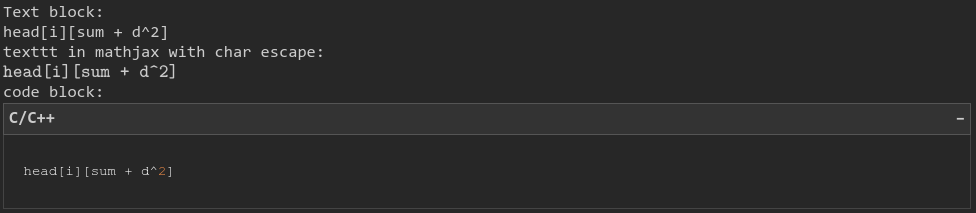
So yeah, the forum is already monospace so text blocks let you put code without it possibly getting marked up, but it doesn't stand out. `texttt{}` produces text in a different font so it slightly stands out, but not as much as I thought.
I might just use text blocks in backticks, but I think it would be nice to have some way to visually distinguish code snippets without needing to put them on their own line(s)
